Claude Code can build you a website in one prompt. The problem is that by default it builds the same website everyone else gets: Inter font, a purple blue gradient, a grid of cards with emojis. That look has a name now, AI slop, and visitors recognize it instantly.
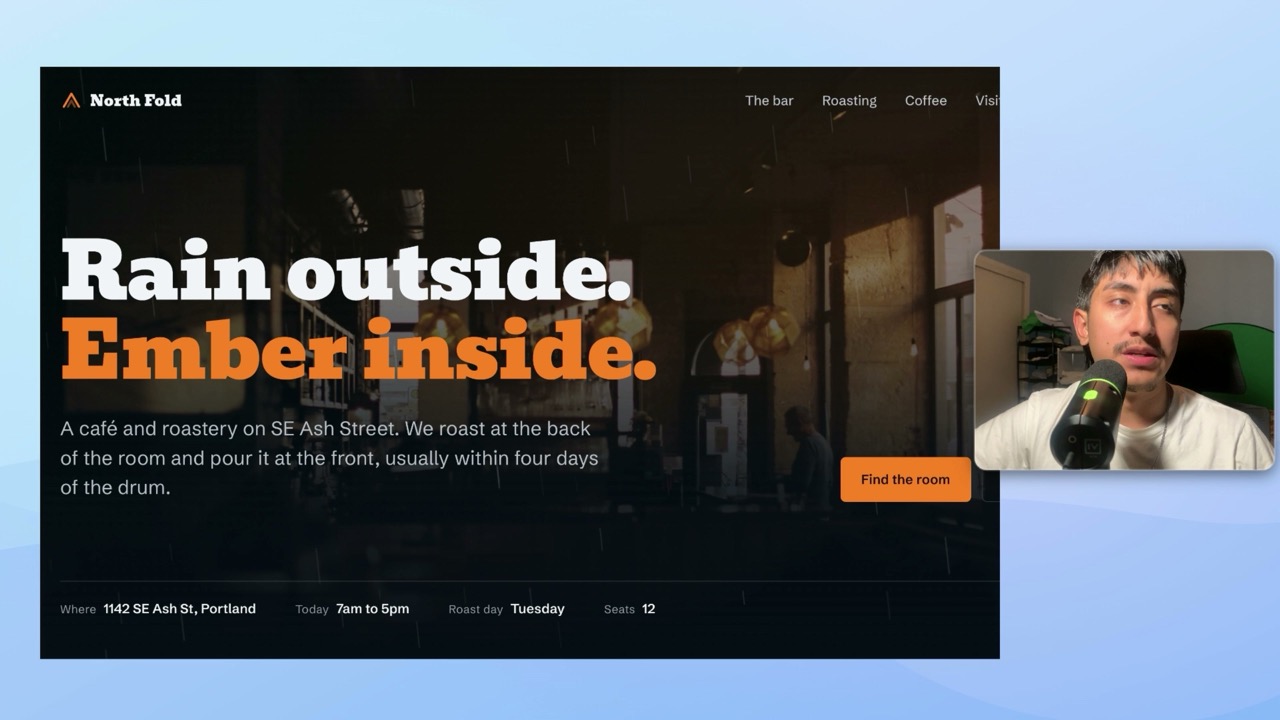
In this video I walk through four ways to force Claude Code out of that default and into output that actually looks designed. All four were tested on the same made up brand, a coffee roaster called North Fold, so you can compare the results directly.
Method 1: The impeccable skill
I tried dozens of website building skills, and impeccable is the best one I found. You install it with a single command (or just paste the URL into Claude Code and tell it to install it for you), reload your window, and confirm it shows up under your slash commands.
From there you prompt normally: build a landing page for North Fold Coffee. The skill asks you style and design questions to personalize the output, then runs its own design rules while building. The result in the video uses real photography, a distinctive font, and completely different spacing from the slop baseline I show at the start. Same prompt effort, very different ceiling.
Method 2: Give it a reference, not a description
This method has three levels, in increasing order of fidelity.
Level 1 is a screenshot. Find a site whose style you like, screenshot it, paste the image into Claude Code, and ask for your landing page matching the visual style of the attached screenshot.
Level 2 is template libraries. These are libraries of ready made templates with prompts attached. Pick one, copy the prompt it comes with, and append your own line: adapt all of this to North Fold Coffee, keep the structure, rewrite the copy, swap the palette to warm coffee tones. Canva also has a completely free template library that works the same way.
Level 3 is the URL directly. Take an award winning site, hand Claude Code the link, and tell it to scrape the site as an exact structural reference while personalizing everything for your brand.
One caveat: use this method for structure and style only. The content has to be yours. And if you are worried that everyone using the same references means every site looks the same, that mostly does not matter for client work. What matters is presenting the offer cleanly. The personal brand carries the site, not structural novelty.
Method 3: Lock the design system before it generates
This is how a real designer would work. Before prompting anything, you create a CLAUDE.md file containing your design system: the rules Claude has to follow every time it touches the site. In mine I explicitly banned the generic AI slop patterns and specified the style I wanted instead.
Then I combined it with Anthropic's own frontend aesthetics cookbook prompt, which they publish themselves, and asked for the North Fold hero section following the design rules in the CLAUDE.md file. You can watch Claude read the file in, extract the rules, and build inside them.
The key idea: you are telling Claude what not to do at the same time as how to do it. Instead of letting it wander off to its defaults, you set the system it has to operate within.
Method 4: Own the last 20% by hand
Claude does the first 80%, you do the last 20%, because that last stretch is where your taste lives.
I took the Method 1 site, which was already good, and made a pass by hand: swapped the stock photos, fixed a photo it used twice, rewrote wording that repeated itself, and adjusted styling that felt too AI generated. Funny enough, when I tried changing some wording, the impeccable skill's detector flagged the edit and pushed back, which tells you the skill is doing its job.
The point is not that the AI output was bad. It is that a first draft plus your personal taste beats either one alone.
The full setup guide
Every link, prompt, and template from the video is in a written post in my free Skool community, linked in the video description. If you have questions, drop them in the comments.