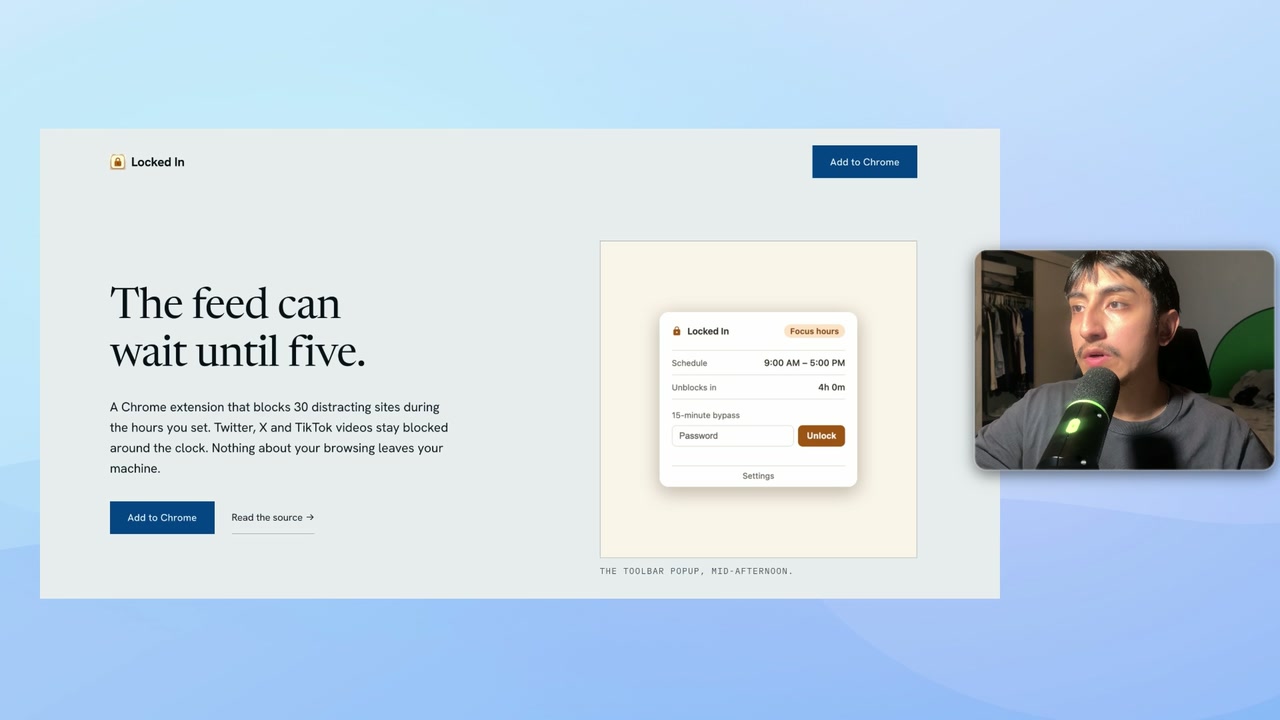
Ask Claude Code for a landing page and you get the same page everyone else gets. Big centered headline, three cards in a row with icons, a call to action band, a four column footer. It is not broken code. It works. It is just the page every AI makes, because every AI learned from the same ten thousand websites.
In this video I build the same site twice. Once with nothing, which produces exactly that generic result, and once with a free skill called Hallmark. Same model, same tool, same product, about five minutes apart.
The product is real, by the way. It is Locked In, my Chrome extension that blocks distracting sites during the work hours you set.
What Hallmark actually is
Hallmark is free and open source, made by Nutlope and Together AI.
The important part is what it is not. It is not a model. It is not a subscription. It is a folder of rules that changes what Claude reaches for when it designs. That distinction matters, because it means the improvement is not costing you anything per use and it is not locked behind a service.
Let Claude Code install it for you
You do not have to install this by hand. Paste the GitHub URL into Claude Code and tell it to install the skill globally so it is available in every project. It handles the command itself.
Watch the output while it runs. Before installing, it inspects the skill. That is worth paying attention to rather than skipping past, because a skill runs with full permissions on your machine. Anything you install this way can read and write your files. Hallmark is open source so you can read exactly what it does, but the habit of reading that scan output is one you want for every skill you ever install, not just this one.
Once it finishes, it is installed and ready.
It refuses to design before it knows who the page is for
This is the part that separates it from a prompt template.
I gave it an empty folder, pointed it at my extension so it could analyze the actual product, and asked for a landing page. It did not start writing code. It stopped and asked me questions first.
It wanted to know who the page is for, what the one action is, and what tone to take. It also noticed my extension already had its own established design, and asked whether to stay on brand with that or rotate to a different theme from its catalog. For the video I picked the rotation, just to see what it would come up with on its own.
Most AI output is bad because the model guesses at context it was never given. Hallmark makes you supply it before a single line gets written.
It tells you the shape of the page before it builds
After the questions, it prints the exact structure it has chosen. The layout, the theme, the navigation, the footer, all named before any code exists.
That is your cheap moment to redirect. Changing a decision at that point costs one sentence. Changing it after a full build costs a rebuild. If you hate the direction, you say so right there.
The rules it holds itself to
While it builds, it works inside constraints that are worth knowing about, because they are the specific things that make AI sites look fake:
- Real screenshots only. It refuses to draw fake browser windows or invent product UI. If you have screenshots, it uses them. If you do not, it does not fabricate them.
- No invented statistics. It will not write "trusted by 50,000 users" unless you actually have 50,000 users. This one quietly saves you from shipping a lie.
- It checks its own work. Before handing anything back it runs its output against 58 quality rules, and fixes what fails.
- Mobile is not optional. Working on small screens is one of the rules it will not let itself break.
That self check is the underrated feature. In my own test run it caught a layout bug in its own work that would have broken the entire page on a phone, and fixed it before showing me anything.
What actually changed
The finished site is spaced properly, uses a real typographic hierarchy, and pulls in screenshots I already had instead of inventing product shots. None of the generic giveaways are there.
Same product, same information, same model, same tool. The only difference is a folder of rules telling it what good looks like.
If you have ever thought your AI built site looks generic, this is why, and this is the cheapest available fix.
The full setup guide
The skill is free, it installs in one command, and the exact prompt I used is written up in my free Skool community, linked in the video description. If you build something with it, or you get stuck, drop a comment on the video.